Most “I finished the offer but got nothing” tickets come down to tracking, not Rewrrd withholding points. We now ask you to acknowledge five short rules on Earn before you start. Here’s what they mean — and the iPhone screen you should tap Allow on.
1. Allow Tracking on app offers
App and game offers need the advertiser ID to match your install to your Rewrrd account. On iPhone, iOS shows this prompt the first time the app asks. Tap Allow — not “Ask App Not to Track.” If you decline, gameplay often never reports, so the wall never pays.
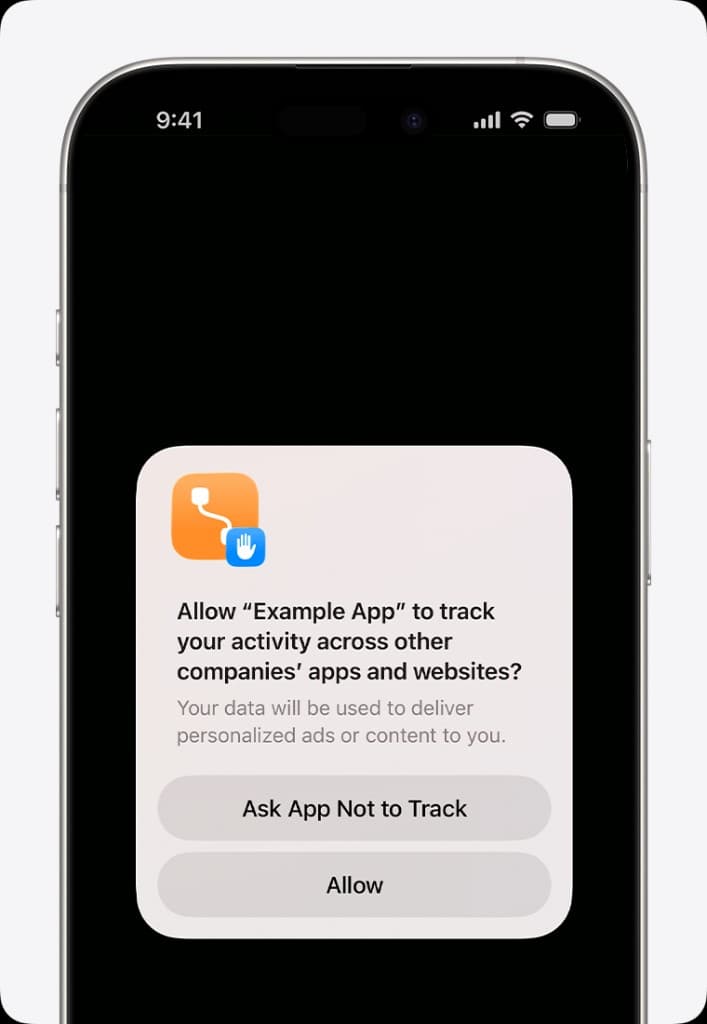
On Android, allow the app to use advertising / tracking when asked, and don’t force-stop the app right after install. Keep Rewrrd and the offer app on the same phone until the first step pays.
2. One device per offer
Start and finish every listed step on the same phone or computer. Opening the offer on desktop, then switching to a second phone, usually creates a new click ID. The advertiser then treats you as a different user and your Rewrrd click never converts.
3. One completion per person, per device
Each offer is meant to be done once. Repeating it on another account, emulator, or factory-reset device is typically blocked — and can get the whole account flagged. If you’ve already completed an offer, pick a different one from Earn instead of retrying.
4. Credits are usually fast — but can take 24 hours
Surveys and many games pay within a few minutes. Some advertisers hold the conversion overnight. Don’t restart, uninstall, or open the offer on a second device while you wait; that can cancel the pending credit. Check Active offers on Earn, then wait out the day before contacting support.
5. Phone apps usually pay more
High-paying games and installs are often mobile-only. Use the same Rewrrd account on your phone (QR on desktop if you started there), skip VPNs, and stay on a normal home or cell connection so geo and device match what the wall showed you.
Quick recap
- Tap Allow on the tracking prompt (picture above).
- Finish every step on the same device you started.
- One offer per person and device — don’t recycle it.
- Give pending credits up to 24 hours before you retry.
- Use your phone (no VPN) for the big app payouts.
New to Rewrrd? Read the step-by-step guide after you lock in tracking.